# arifur9993/attendance-engine-mcp [Health: Active]
**Category:** 🏢 Workplace & Productivity
**Repository:** https://github.com/arifur9993/attendance-engine-mcp
**GitHub Stars:** 1
**npm Downloads (last month):** 60
**Views:** 2
**Installs:** 0
**Upvotes:** 0
**Directory Page:** https://allmcps.com/mcp/arifur9993-attendance-engine-mcp
## Description
Workforce attendance, overtime, overnight shifts, rotating rosters, and California wage-and-hour compliance (Labor Code §§ 226.7, 512; Donohue v. AMN). 8 tools backed by @attendance-engine/core — a pure-function, zero-deps, 100%-covered engine. Deterministic answers; same query, same answer, every time.
## Tools
Capabilities this server exposes over MCP:
- **resolve_day** — Resolve a single duty day from raw clock punches and a shift definition. Returns a structured DayResult with status, worked minutes, lateness, early-out, overtime, overnight handling, breaks-deducted minutes, data-integrity flags, and the resolved in/out segments.
- **resolve_period** — Resolve a sequence of duty days (a week, a pay period, a month). Returns per-day DayResult entries; optionally include an aggregated PeriodSummary with attendance rate and flag counts.
- **evaluate_break_compliance** — Analyse meal & rest period compliance for a duty day under a jurisdiction rule pack. v0.1 ships the California pack (Labor Code §§ 226.7, 512; IWC wage orders). Returns per-meal/rest analysis, premium hours owed at the regular rate, waiver issues, and rebuttable-presumption risk per Donohue v. AMN.
- **apply_rounding** — Produce a rounded view of a resolved day's worked & overtime minutes without losing the exact-minute result. Useful for the California-style 'exact-minute is the baseline; rounding must be provably neutral' pattern — keep both views and compare across populations.
- **generate_roster** — Generate a rotating roster from a built-in pattern ('2-2-3', '4-on-4-off', 'dupont', 'pitman') or a custom day cycle. Returns one assignment per calendar date with shift label and HH:MM window, or null on rest days.
- **list_rule_packs** — List bundled jurisdiction rule packs (meal/rest compliance). Returns each pack with id, human label, citation source, and full rule definitions.
- **audit_period_compliance** — Run a wage-and-hour compliance audit across multiple days. For each day, resolves attendance and evaluates meal/rest compliance under the chosen jurisdiction rule pack. Returns per-day breakdown plus period totals: hours of premium owed (meal + rest), days at risk, days with rebuttable-presumption exposure, and a flag-count heatmap. Use this for monthly payroll review, pre-audit triage, or a manager dashboard.
- **diagnose_punches** — Triage raw clock punches before trusting them: count, sort, dedup, surface duplicates / odd-punch counts / round-number bias, report longest and shortest gaps, and (when an expected shift is provided) flag punches that fall outside it. Returns a recommendation: 'usable', 'review', or 'reject'.
## Claude Desktop Quick Installation
Install path detected from listing signals. Uses `npx` (confidence: high):
```json
"mcpServers": {
"attendance-engine-mcp": {
"command": "npx",
"args": ["-y","@attendance-engine/mcp"]
}
}
```
## Documentation & README
# 🕒 attendance-engine MCP
### Wage-and-hour answers your AI agent can actually trust.
**Ask Claude *"Did anyone miss a meal break last Tuesday?"* — and have it actually be right.**
[](https://www.npmjs.com/package/@attendance-engine/mcp)
[](https://github.com/arifur9993/attendance-engine-mcp/actions)
[](LICENSE)
[](https://modelcontextprotocol.io/)
---
## 🤔 The problem
Every HR / payroll / time-tracking team eventually asks Claude (or Cursor, or Windsurf) something like:
> *"Rahim's punches yesterday were 09:00, 13:00, 14:00, and 18:00. Did he get his meal break under California rules?"*
And the LLM does what LLMs do: it eyeballs the timestamps, mumbles something about "yes probably, his lunch looks fine," and moves on. Sometimes it's right. Sometimes it forgets that California requires the meal to *start before the end of the 5th hour*. Sometimes it counts a 25-minute break as compliant. Sometimes, for an overnight shift that crosses midnight, it just gives up.
**You can't put that in front of an auditor.** You can't ship it inside a payroll product. You can't trust it with overtime calculations that turn into back-pay liability if they're wrong.
## 💡 What this is
A small **Model Context Protocol** server that gives your AI agent **deterministic, tested, fixture-backed tools** for:
- Resolving a duty day from raw clock punches (overnight, breaks, OT, all of it).
- Auditing meal/rest compliance under the **California** rule pack (Labor Code §§ 226.7, 512; IWC wage orders), including *Donohue v. AMN* rebuttable-presumption signals.
- Rounding worked time without losing the exact-minute baseline (so you can prove your rounding is neutral).
- Building rotating rosters: 2-2-3, 4-on-4-off, DuPont, Pitman.
- Triaging suspicious punch streams *before* you trust them.
- Running a multi-day **wage-and-hour audit** across a whole pay period and rolling up premium hours owed, days at risk, and the flag heatmap.
The math lives in [`@attendance-engine/core`](https://www.npmjs.com/package/@attendance-engine/core) — a pure-function, zero-deps TypeScript library with 100% test coverage. This MCP server is the thin agent surface on top.
## 🧠 How it actually works
```mermaid
flowchart LR
A[You: "Did Rahim miss his meal break last Tuesday?"]
B[Claude / Cursor / Windsurf]
C[attendance-engine MCP]
D[("@attendance-engine/core
pure-function engine
100% coverage")]
A -->|prompt| B
B -->|tool call| C
C -->|function call| D
D -->|"DayResult + ComplianceResult"| C
C -->|"JSON content block"| B
B -->|"plain-English answer with citations"| A
classDef user fill:#0b3d91,stroke:#fff,color:#fff
classDef host fill:#5b1ea3,stroke:#fff,color:#fff
classDef mcp fill:#1f6f43,stroke:#fff,color:#fff
classDef core fill:#7c4a03,stroke:#fff,color:#fff
class A user
class B host
class C mcp
class D core
```
Two important properties:
1. **Claude doesn't do the math.** It picks a tool, fills the arguments, and forwards the answer. If the engine says "this was a late meal," the agent says "this was a late meal." If you re-ask the same question, you get the same answer — every time.
2. **Time zones are explicit, not guessed.** Every timestamp carries its own offset. The engine never reads the host clock, never assumes UTC, never silently converts. DST days work because *you* told it the offset, not because it inferred it.
## 🚀 Install — pick your host
Pick the MCP host you're already using. Same one-liner everywhere:
Claude Desktop (macOS / Windows)
Edit `~/Library/Application Support/Claude/claude_desktop_config.json` on macOS or `%APPDATA%\Claude\claude_desktop_config.json` on Windows:
```json
{
"mcpServers": {
"attendance-engine": {
"command": "npx",
"args": ["-y", "@attendance-engine/mcp"]
}
}
}
```
Fully quit and relaunch Claude Desktop (Cmd-Q on macOS — closing the window isn't enough).
Cursor
`~/.cursor/mcp.json`:
```json
{
"mcpServers": {
"attendance-engine": {
"command": "npx",
"args": ["-y", "@attendance-engine/mcp"]
}
}
}
```
Windsurf
`~/.codeium/windsurf/mcp_config.json`:
```json
{
"mcpServers": {
"attendance-engine": {
"command": "npx",
"args": ["-y", "@attendance-engine/mcp"]
}
}
}
```
Any other MCP host
Launch the stdio binary directly:
```bash
npx -y @attendance-engine/mcp
```
The server speaks JSON-RPC over stdin/stdout — that's the whole contract.
## 🎬 See it in action
> **🖼️ Scenario cards below are publish-ready SVG mockups** (render inline on GitHub, npm, LinkedIn). Real-product screenshots can replace them when you capture them — see [`docs/screenshots/README.md`](https://github.com/arifur9993/attendance-engine-mcp/blob/HEAD/docs/screenshots/README.md).
### Scenario 1 — Did the night-shift nurse get her meal break?
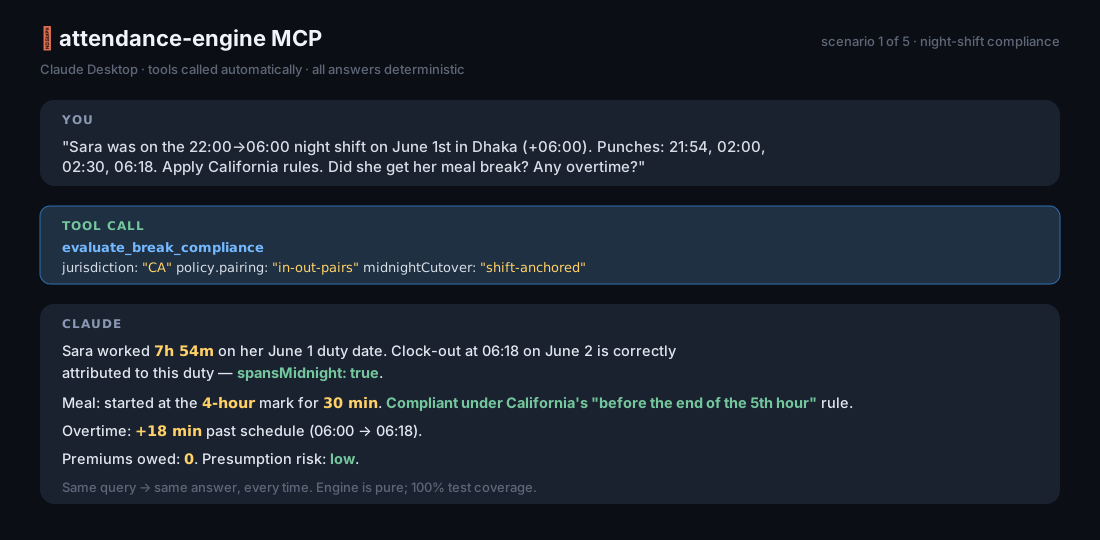
> **You:** *"Sara was on the 22:00→06:00 shift on June 1st. Punches: 21:54, 02:00, 02:30, 06:18. Apply California rules."*
>
> **Claude (calls `evaluate_break_compliance`):** *"Sara worked 7h54m on her duty date of June 1st (her clock-out fell on June 2nd but belongs to this shift). She took a 30-minute meal beginning at her 4-hour mark, which is compliant under California's mandate to start the first meal before the end of the 5th hour. Worked time spans midnight; flagged accordingly. She left 18 minutes past schedule — that 18m counts as overtime."*
### Scenario 2 — Find every late-meal day this month
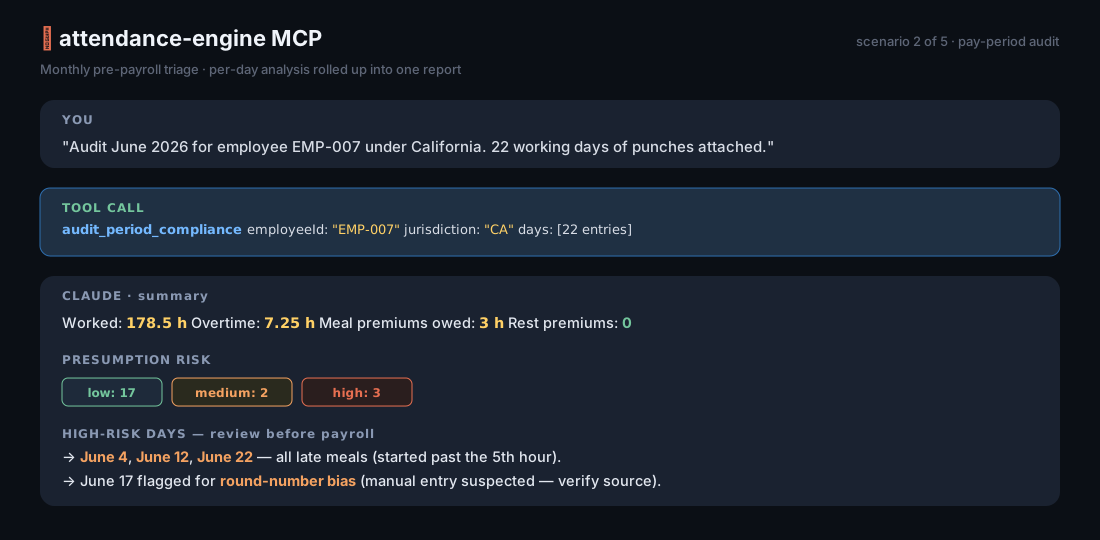
> **You:** *"Run an `audit_period_compliance` for employee EMP-007 across June 2026. Here are 30 days of punches and shifts. Use California."*
>
> **Claude:** *"3 days at high presumption risk — June 4, June 12, June 22. All three are late meals (started past the 5th hour). Total meal-period premium hours owed: 3. June 22 also drops below the 12-hour second-meal threshold. No rest-period violations detected."*
### Scenario 3 — Are these punches even usable?
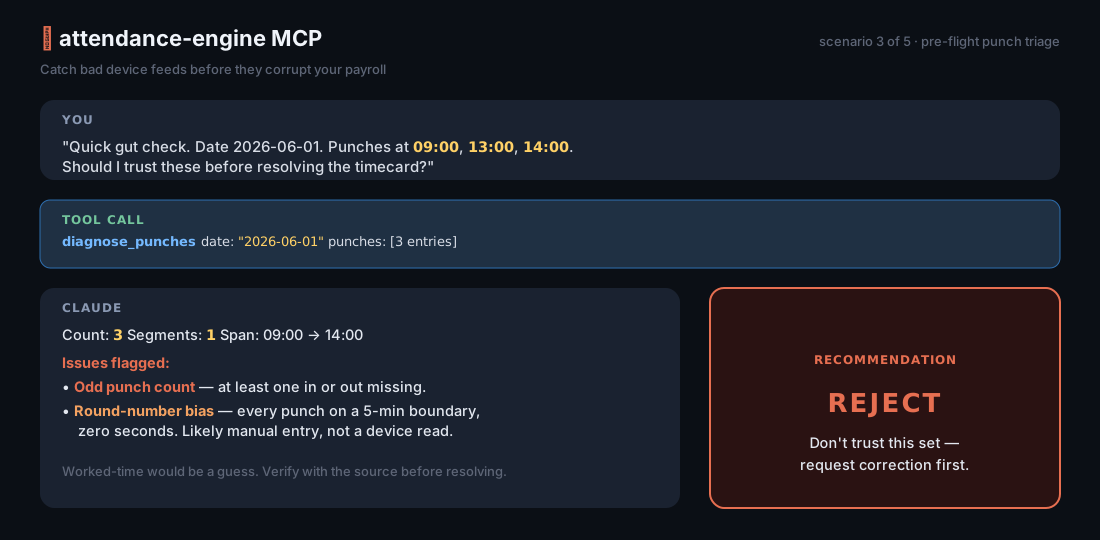
> **You:** *"I have punches 09:00, 13:00, 14:00 for June 1st. Can I trust these?"*
>
> **Claude (calls `diagnose_punches`):** *"Recommendation: **reject**. The punch count is odd — one in or out is missing. Without that, worked-time and overtime would be guesses. Also: every punch falls on a 5-minute boundary, which often indicates manual entry rather than a device read. Worth verifying with the source system before resolving."*
### Scenario 4 — Plan a 4-on-4-off roster for next month
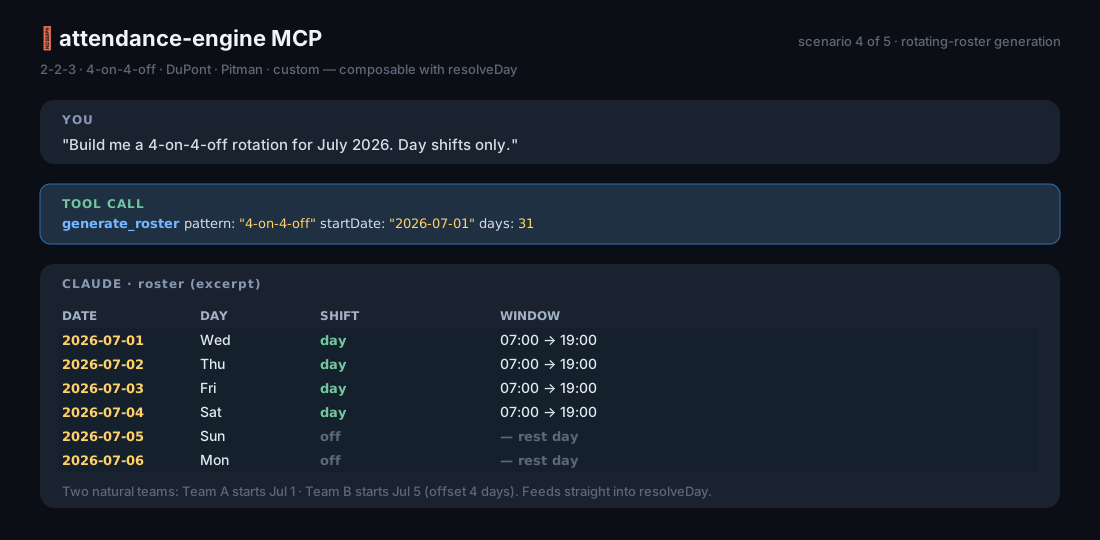
> **You:** *"Build me a 4-on-4-off roster for July 2026."*
>
> **Claude (calls `generate_roster`):** *"31 days — work days on July 1–4, 9–12, 17–20, 25–28 (12h day shifts, 07:00–19:00). Rest days fill the gaps. Want me to assign team rotations across this pattern?"*
## 🛠️ Tools at a glance
| Tool | When you'd use it |
|---|---|
| **`resolve_day`** | "What happened on this single day? Lateness, OT, segments, flags." |
| **`resolve_period`** | "Roll up a week or a month: per-day results plus an aggregated summary." |
| **`evaluate_break_compliance`** | "Did this person get their meal/rest breaks under California law? Is any premium owed?" |
| **`audit_period_compliance`** | "Audit a whole pay period. Show me total premium hours, high-risk days, and the flag heatmap." |
| **`apply_rounding`** | "Round worked/OT minutes to a unit — and keep the exact view alongside it so I can prove neutrality." |
| **`diagnose_punches`** | "Triage this raw punch stream. Should I trust it?" |
| **`generate_roster`** | "Build a 2-2-3 / 4-on-4-off / DuPont / Pitman / custom rotation." |
| **`list_rule_packs`** | "What jurisdictions are supported?" *(currently CA; more arrive in minor releases)* |
## 📚 Resources & prompts
Resources you can paste into a chat:
| URI | What it is |
|---|---|
| `attendance://docs/overview` | One-pager about the engine, time-zone rules, and how the tools compose. |
| `attendance://docs/api` | Compact field-by-field API reference. |
| `attendance://rules/CA` | The California rule pack as JSON — meal/rest thresholds, waiver limits, premium caps, the citation source. |
Guided prompts (the host's `/` menu, or `prompts/get`):
- **`analyse_timecard`** — walks the model through the right tool calls to analyse a single duty day.
- **`roster_planner`** — generates a roster and renders it as a Markdown table.
## 🕰️ The time-zone rule (read this once and you're fine)
Every ISO timestamp must carry its own offset:
- ✅ `2026-06-01T08:57:00+06:00`
- ✅ `2026-06-01T08:57:00Z`
- ❌ `2026-06-01T08:57:00` *(rejected — the engine won't guess)*
The engine reduces everything to absolute instants on a single timeline. DST works because the offsets are explicit. The duty date and shift `HH:MM` are worksite local wall-clock — match them to your business calendar, not to UTC.
For days with no punches (an absence, a holiday), pass `policy.tzOffsetMinutes` explicitly so the engine has something to anchor the shift window to.
## 🤝 Embedding (advanced)
Building your own host? Skip the CLI:
```ts
import { createServer } from '@attendance-engine/mcp';
import { StdioServerTransport } from '@modelcontextprotocol/sdk/server/stdio.js';
const server = createServer({ name: 'my-hr-server', version: '1.0.0' });
await server.connect(new StdioServerTransport());
```
Use it for: custom HTTP/SSE adapters, Claude Agent SDK setups, test harnesses, in-house deployments where the binary needs to live inside a bigger Node process.
## 💪 What it's good for
- Internal HR / payroll / workforce-analytics chat assistants
- Audit-prep workflows for California employers
- Customer-support tools at HR-tech vendors who need their AI to actually be right
- Pre-payroll compliance triage ("which days need a human to review?")
- Schedule planners that need a real roster engine, not vibes
## 🧱 What it's not
- A leave-balance / accrual system (the engine deals in minutes, not entitlements).
- A payroll-money calculator (it gives you the hour buckets — *you* multiply by the rate).
- A biometric device protocol (pair it with whatever ingest layer you've got).
- A UI. There's no dashboard in here; that's a separate concern.
## 🌍 Compatibility
| | |
|---|---|
| **Node** | 18+ (CI runs 20 LTS) |
| **MCP SDK** | 1.x |
| **Engine** | `@attendance-engine/core` ≥ 0.4 (peer dep) |
| **Hosts tested** | Claude Desktop 1.x · Cursor · Windsurf · any stdio MCP client |
## 📖 More reading
- 📑 [Detailed scenarios with full tool transcripts](https://github.com/arifur9993/attendance-engine-mcp/blob/HEAD/docs/scenarios.md)
- 🖼️ [How to capture your own demo screenshots](https://github.com/arifur9993/attendance-engine-mcp/blob/HEAD/docs/screenshots/README.md)
- 📚 [Engine API reference](https://github.com/arifur9993/attendance-engine/blob/main/packages/core/docs/api.md)
- 🌐 [Time-zone semantics](https://github.com/arifur9993/attendance-engine/blob/main/packages/core/docs/timezones.md)
- 🏛️ [California Labor Code §§ 226.7, 512](https://www.dir.ca.gov/dlse/faq_mealperiods.htm)
- 🏛️ [Donohue v. AMN Services (Cal. 2021)](https://law.justia.com/cases/california/supreme-court/2021/s253677.html)
## ❤️ Credits
Built by [Md. Arifur Rahman](https://www.linkedin.com/in/md-arifur-rahman-mar/). Companion to [`@attendance-engine/core`](https://github.com/arifur9993/attendance-engine) (TypeScript) and [`arifur9993/attendance-engine`](https://github.com/arifur9993/attendance-engine-php) (PHP). Same author, same fixtures, same answers — in three places your stack can reach for.
## License
MIT — see [LICENSE](https://github.com/arifur9993/attendance-engine-mcp/blob/HEAD/LICENSE).