# AKShare
**Category:** 💻 Developer Tools
**Repository:** https://github.com/agentpit-io/hunter-community
**Views:** 0
**Installs:** 0
**Upvotes:** 0
**Directory Page:** https://allmcps.com/mcp/akshare
## Description
Let a model explore AKShare's 1000+ China market data functions on its own — search, inspect, call
## Claude Desktop Quick Installation
Heuristic fallback — verify the package name and runner against the repository README before running it. Uses `npx` (confidence: low):
```json
"mcpServers": {
"akshare": {
"command": "npx",
"args": ["-y","akshare"]
}
}
```
## Documentation & README
**🌏 中文(当前)· [English](https://github.com/agentpit-io/hunter-community/blob/HEAD/README_EN.md)**

# HunterCode
### Community Edition
**自部署的 AI 投研助手 · A股 / 港股 / 美股 · 数据和对话都在你自己的机器上**
HunterCode 是腾讯 WorkBuddy 金融版的开源本地替代方案 · 面向私募与专业个人投资者
腾讯、WorkBuddy 是腾讯公司的商标。HunterCode 与腾讯公司无隶属、合作或授权关系。
[](./LICENSE)
[](https://github.com/agentpit-io/hunter-community/actions/workflows/ci.yml)
[](https://github.com/agentpit-io/hunter-community/releases)
[](https://github.com/agentpit-io/hunter-community/stargazers)
[](https://github.com/agentpit-io/hunter-community/discussions)
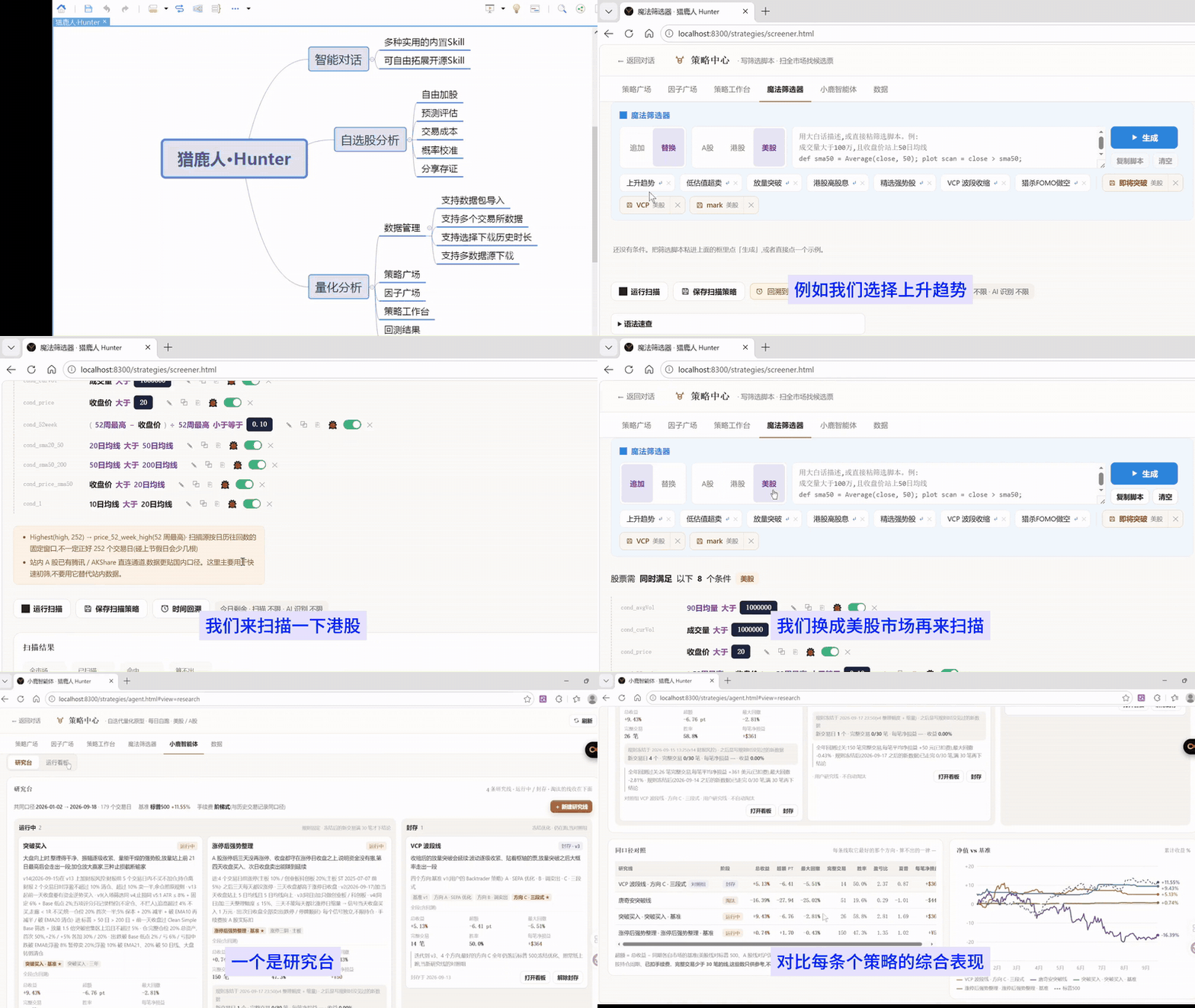
[**🚀 在线演示**](https://hunter-community.agentpit.io) · [**⚡ 5 分钟部署**](#-5-分钟跑起来) · [**📖 文档**](https://github.com/agentpit-io/hunter-community/blob/HEAD/docs/01-getting-started.md) · [**💬 讨论区**](https://github.com/agentpit-io/hunter-community/discussions)
🏆 [入围世界人工智能开源大赛(GOAI)总决赛 · 赛道二 TOP 15](https://mp.weixin.qq.com/s/n8olfrqdP0-rkj6mU_N6Hg) · [与 WorkBuddy 金融版逐项对比(附官方来源)](https://www.agentpit.io/compare/workbuddy) · [完整演示视频 3 分钟(2026-09-19 录制)](https://www.agentpit.io/media/huntercode-demo-0919.mp4)
> **⚠️ 免责声明**:本项目是投研分析工具,所有输出为 AI 生成内容,仅供研究参考,不构成任何投资建议。投资有风险,决策需谨慎。
---
## ⏱ 30 秒看懂
**它是什么** —— 一个跑在你自己电脑或服务器上的金融 AI 助手。你给它一个大模型 key,它就能查行情、拉新闻、做个股深度分析、预测走势、管理自选和持仓,并按你写的 SKILL(分析方法论)工作。对话、持仓、投资论点全部存在本地数据库。
**它不是什么** —— 不接券商交易,不替你做决策,不保证预测准确。它是把公开数据、分析方法论和大模型组织起来的研究助手。
**适合谁** —— 会用 Docker 的个人投资者、私募研究员、小型量化团队;想掌控自己的数据,或想把自己的数据源和方法论接进来的人。
---
## ☁️ 一键部署到云平台
不想自己管服务器的,可以直接部署到下面这些平台,部署完打开域名走一遍首启向导就能用。
| 平台 | 适合谁 | 说明 |
|---|---|---|
| [Zeabur](https://github.com/agentpit-io/hunter-community/blob/HEAD/docs/deploy/zeabur.md) | 国内外都能用,能力最全 | 模板自动生成密钥、绑域名、挂卷 |
| [Sealos](https://github.com/agentpit-io/hunter-community/blob/HEAD/docs/deploy/sealos.md) | 国内用户 | K8s 模板,postgres / redis 走 KubeBlocks |
| [Railway](https://github.com/agentpit-io/hunter-community/blob/HEAD/docs/deploy/railway.md) | 海外用户 | 控制台里手工搭 6 个服务的逐条清单 + 生成模板的步骤 |
| [1Panel](https://github.com/agentpit-io/hunter-community/blob/HEAD/docs/deploy/1panel.md) | 自有服务器 + 国产面板 | 应用包,表单里填端口和口令即可 |
| [Coolify / Dokploy](https://github.com/agentpit-io/hunter-community/blob/HEAD/docs/deploy/coolify-dokploy.md) | 自有服务器 + 自托管 PaaS | **两份可以整段粘贴的 compose** |
> ℹ️ **这一版还没有「一键部署」按钮。** 我们没有这些平台的账号,一次真实部署都没做过,
> 更没有上架到任何一家的模板市场 —— 所以不放按钮,只给文档。
> 每份模板都做过**等价验证**:把模板机械翻译成 compose(同镜像、同环境变量、
> 用平台自己的方式生成的随机密钥、同卷、同依赖),在本机从空卷跑完
> 「六服务健康 → 走完向导 → 真实对话 → 深度分析 → 重启数据不丢」。
> 各篇文档里都写明了「哪些验过、哪些没验过、平台上要自己核对什么」。
> 有账号的朋友帮忙实测一次,欢迎来
> [Issues](https://github.com/agentpit-io/hunter-community/issues) 说结果 —— 验过就加按钮。
**公网部署必看**:这些平台上的实例一创建就在公网上。模板都默认
关掉了单用户免登录(`HUNTER_SINGLE_USER=0`)并生成了一道初始化口令
`HUNTER_SETUP_TOKEN`,向导第 0 步要填它 —— 不然谁先打开谁就能把大模型配成他自己的。
口令在平台的环境变量面板里看。
---
## 🖥 桌面启动器(推荐给不熟悉命令行的用户)
**下载 → 填一把 key → 等几分钟,整套 HunterCode 自动装好,全程不用敲一条命令。**
装完打开按向导走:欢迎 → 填 key → 一次授权 → 选模型 → 自动安装。检测 Docker、挑下载源、
算端口、写配置、拉镜像、起容器由它连着跑完,装好自动打开浏览器。
启动器仓库:[agentpit-io/HunterLauncher](https://github.com/agentpit-io/HunterLauncher) ·
图文说明与截图:[www.agentpit.io/hunter-community](https://www.agentpit.io/hunter-community)
 —— 徽章上就是当前最新版,下面的链接永远指向它,不用找版本号。
| 平台 | 直接下载(国内可达) | 其他来源 |
|---|---|---|
| **macOS** 12+ · Intel / Apple 芯片通用 | [hunter-launcher-latest-universal.dmg](https://www.agentpit.io/media/hunter-launcher/latest/hunter-launcher-latest-universal.dmg) | [GitHub Releases](https://github.com/agentpit-io/HunterLauncher/releases) |
| **Windows** 10 / 11 · x64 · **推荐** | [hunter-launcher-latest-x64-setup.exe](https://www.agentpit.io/media/hunter-launcher/latest/hunter-launcher-latest-x64-setup.exe) | [GitHub Releases](https://github.com/agentpit-io/HunterLauncher/releases) |
| **Windows** · 组策略分发 | [hunter-launcher-latest-x64.msi](https://www.agentpit.io/media/hunter-launcher/latest/hunter-launcher-latest-x64.msi) | [GitHub Releases](https://github.com/agentpit-io/HunterLauncher/releases) |
| **Linux** x64 | [hunter-launcher-latest-amd64.deb](https://www.agentpit.io/media/hunter-launcher/latest/hunter-launcher-latest-amd64.deb) / [.AppImage](https://www.agentpit.io/media/hunter-launcher/latest/hunter-launcher-latest-amd64.AppImage) | [GitHub Releases](https://github.com/agentpit-io/HunterLauncher/releases) |
> 这几个链接是**固定的**:每次发版都会把最新安装包覆盖到同一个地址,
> 所以收藏它、贴进文章、做成二维码都不会失效。
>
> 想要带版本号的包、逐个文件的 sha256、或是历史版本,看
> [checksums.txt](https://www.agentpit.io/media/hunter-launcher/latest/checksums.txt)、[manifest.json](https://www.agentpit.io/media/hunter-launcher/latest/manifest.json)
> 与 [Releases](https://github.com/agentpit-io/HunterLauncher/releases)。`manifest.json` 里有当前版本号、发布日期与三个包的
> 体积和完整 sha256 —— [下载页](https://www.agentpit.io/hunter-launcher) 显示的就是它。
**系统要求**
* **macOS 12+**(Intel / Apple 芯片通用)—— **不需要你先装 Docker**。本机没有 Docker 时,
启动器会自己准备一套运行环境(内置 Colima + Lima,全装在 `~/.hunter/runtime`),
不碰你已有的 `~/.colima`、`~/.lima`、别人的容器与数据卷。本机已有 OrbStack /
Docker Desktop / Colima 的话它一个字节都不下。
* **Windows 10 / 11 · x64** —— **需要你先装好
[Docker Desktop](https://www.docker.com/products/docker-desktop/) 与 WSL2**。
Windows 上装 Docker Desktop 要 WSL 与管理员权限,启动器这一版还没有做这条链路;
装好 Docker Desktop 之后回来点一次「重新检测」就能继续。
**安装包没有做代码签名,第一次打开要放行一下**
* **Windows**:SmartScreen 会拦一下 —— 点「**更多信息**」→「**仍要运行**」。
* **macOS**:**不要双击**,在图标上**右键 → 打开**,在弹出的对话框里再点一次「**打开**」。
**现状(如实说明)**
* 目前**每一版都标预发布(prerelease)**,原因就是上面那条:包没有代码签名。
* **macOS 已在真机验证过全流程**:2026-09-23 在 Intel · macOS 14.8.5 上跑通了自动准备运行环境
(虚拟机层第一次在真虚拟机上跑通)、开机自检、每日定时备份(LaunchAgent 强制触发后真跑出备份)、
删除应用,以及「**备份 → 删除 → 重装 → 恢复**」闭环(重装 57 秒、6/6 服务健康、数据原样沿用)。
· 已知问题:**0.1.13 及更早版本在 macOS 上的「自动更新」不可用**(会下错成 Linux 的包),
这几版升级请手动下载新安装包覆盖安装。
* **Windows 尚未真机验证**:只在 CI 里编译与打包通过,**没有在任何一台真 Windows 上跑过**。
你是第一个跑的话,欢迎来 [Issues](https://github.com/agentpit-io/HunterLauncher/issues) 说结果。
* Linux 在测试机上真机跑通过从零安装、升级、回滚与离线导入。
> 想自己敲命令,或者要装到远程服务器上,往下看「5 分钟跑起来」—— 两条路装出来的是同一套东西。
---
## 🚀 5 分钟跑起来
**准备**:Docker Desktop(Windows / macOS)或 Docker Engine + Compose v2(Linux) · 磁盘 10 GB · 内存 4 GB(实测峰值约 1.3 GB) · 能访问 `ghcr.io`
六个服务的镜像都同时提供 **amd64 与 arm64**,Apple Silicon 与 arm 云主机原生运行,不用模拟。
> [!IMPORTANT]
> **开始前只需要理解两件事**
> 1. **模型从哪来**。推荐走 **HunterCode 内置额度**:[免费申请一把 `hunt_tools_` 平台 key](https://hunter.agentpit.io/dev/api-keys)(约 30 秒),在向导第 2 步选第一张卡,**不用自己去各家申请大模型 key**,地址和模型名向导自动填好。详见 [内置额度使用说明](https://github.com/agentpit-io/hunter-community/blob/HEAD/docs/builtin-llm/使用说明.md)。
> · **额度**:每把 key **每天 1000 万 token**(输入 + 含 thinking 的输出),北京时间 0 点重置;另有每分钟请求数与并发上限。额度用完不是断服 —— 对话里会用中文说清几点重置、怎么改用自带 key,工具与数据供给照常。额度与服务可能调整或下线。
> · **隐私**:网关只记 token 数与模型名,**不记任何 prompt 与回复内容**。
> · 使用前请读一遍 [**服务条款与可接受使用政策**](https://github.com/agentpit-io/hunter-community/blob/HEAD/docs/builtin-llm/服务条款.md)([English](https://github.com/agentpit-io/hunter-community/blob/HEAD/docs/builtin-llm/terms-of-service.md)) —— 仅限自部署用户的研究用途,禁止转售、禁止当通用 API 用。
> **高级路径:自带大模型 key** —— [DeepSeek](https://platform.deepseek.com/api_keys) 或任何 OpenAI 兼容网关(通义、Claude、GPT、OpenRouter、OneAPI、AIHubMix 等)都行,向导里粘进去当场检测。两条路随时互相切换。
> 2. **数据从哪来(三选一,可以先不管)**:① 免费开源源(A 股行情要在 `.env` 设 `DATA_SOURCE_PROVIDER=akshare`);② 接你自己的 MCP / 数据源;③ 平台数据管道,[免费申请 key](https://hunter.agentpit.io/dev/api-keys)。详见 [数据供给三选一](#-数据供给三选一)。
> 走内置额度的话这一步**已经顺带解决了** —— 同一把 `hunt_tools_` key 也是数据供给的 key,向导会直接告诉你已解锁。
**耗时**:自 v1.1.0 起六个服务**全部走预构建镜像,不再本地构建** —— 首次约 3–5 分钟(全在下镜像),之后 `up -d` 几十秒。向导本身约 1 分钟。
```bash
git clone https://github.com/agentpit-io/hunter-community
cd hunter-community
docker compose up -d
open http://localhost:3100 # 浏览器里完成首启向导,不用改任何文件
```
**没有第二步。** 自 v1.1.0 起 `.env` 一个字都不用改 —— 密钥自动生成、数据库自动迁移、
六个服务全走预构建镜像;大模型在浏览器里配。
### 浏览器里的首启向导
第一次打开会自动进入向导(没配大模型时),五步:
| 步骤 | 做什么 |
|---|---|
| 1 · 环境自检 | 六个服务连通、迁移账本、密钥来源与强度、卷可写、访问方式 —— 逐项真探测 |
| 2 · 选大模型 | **第一张卡是「使用 HunterCode 内置额度」(推荐)**:选中即自动填好地址与模型名,你只要一把 `hunt_tools_` key。下面几张是自带 key 的高级路径,带**实测**的工具调用命中率与耗时(来自 [`docs/model-testing/`](https://github.com/agentpit-io/hunter-community/blob/HEAD/docs/model-testing/model-compat-matrix.md)) |
| 3 · 填 key 当场测 | 连通 → 对话 → 工具调用三项,失败分类报错,**测不通不让保存**;内置额度路径下还会顺带把深度分析指向 `hunter-deep`、用同一把 key 解锁数据供给 |
| 4 · 数据供给 | 免费开源源 / 平台数据管道 / 自接 MCP,三选一,可以跳过。走内置额度的话这里会直接显示「同一把 key 已解锁」 |
| 5 · 完成 | **不重启任何容器**热生效,给三个示例问题带你进对话 |
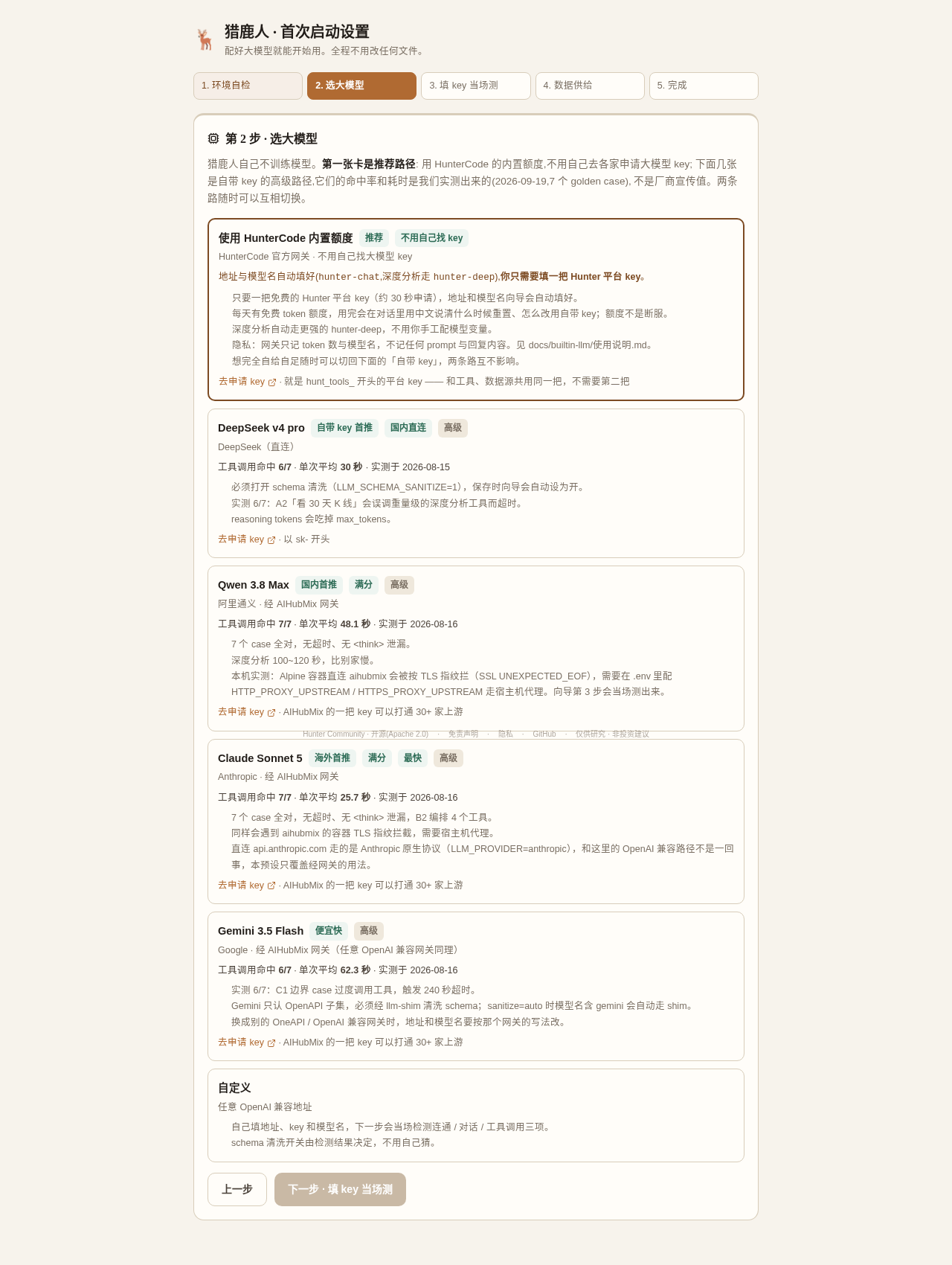
全部截图见 [`docs/screenshots/builtin-llm/`](https://github.com/agentpit-io/hunter-community/blob/HEAD/docs/screenshots/builtin-llm/)(内置额度全流程)
与 [`docs/screenshots/setup-wizard/`](https://github.com/agentpit-io/hunter-community/blob/HEAD/docs/screenshots/setup-wizard/)(自带 key 路径)。
> [!IMPORTANT]
> **这台实例只要能从公网打开,就先在 `.env` 里设 `HUNTER_SETUP_TOKEN`**(随便一串随机值,
> `openssl rand -base64 24`),然后 `docker compose up -d`。
> 不设的话,谁先打开这个页面谁就能配置大模型 —— 向导判断「来源是不是本机」靠的是
> HTTP 转发头,裸 `docker compose`(前面没有 nginx 之类的反代)时那是访问者可以伪造的。
> 设了之后向导第 0 步会要这个口令,连错 5 次锁 15 分钟。本机 / 内网使用不需要设。
**想走老路(在 `.env` 里写死)也行**,而且优先级更高:填了 `LLM_BASE_URL` / `LLM_API_KEY` /
`LLM_DEFAULT_MODEL` 的实例是**锁定**状态,向导只读展示、改不了它(演示站就是这么跑的)。
要换模型改 `.env` 后 `docker compose up -d`(**不是 restart** —— restart 不重读 `.env`)。
内置额度也能写死(一键部署模板会这么预填),写法见
[内置额度使用说明 · 第六节](https://github.com/agentpit-io/hunter-community/blob/HEAD/docs/builtin-llm/使用说明.md#六想在-env-里写死一键部署模板)。
> 不配大模型时六个服务照样健康,只是发消息会收到一句中文的「大模型尚未配置」。
> 想以后再配,向导最后一步点「先进对话页(稍后再说)」即可;
> 要重新跑向导:设置 → 大模型 → 「重新运行初始化向导」。
**要改代码的开发者**叠加开发覆盖文件 —— 它带回本地构建与全部源码挂载(改 `apps/web/public` 下的静态文件、`scripts/` 下的 MCP 与插件都立即生效):
```bash
docker compose -f docker-compose.yml -f docker-compose.dev.yml up -d --build
```
### 从 v1.0.x 升级
```bash
git pull
docker compose pull && docker compose up -d
bash scripts/migrate-volumes.sh # ⚠️ 只有老用户需要,见下
```
> [!WARNING]
> **装过 SKILL / 导入过数据包的老用户必须跑一次 `scripts/migrate-volumes.sh`。**
> v1.0.x 把 `./user-skills` 和 `./data-packages` 两个仓库目录直接挂给 api;
> v1.1.0 起改成 api 自己的具名卷 —— 云平台上没有仓库目录,挂不了。
> 直接升级的话新卷是空的,**你装过的 SKILL 会从界面上消失**。
> 文件一个都没丢(还在 `user-skills/` 下),这个脚本就是把它们搬进新卷;
> 幂等,目标非空时不覆盖。api 启动日志里也会提示。
其余几处变化不需要你做什么:
- `JWT_SECRET` 留空不再拒绝启动 —— 首次启动自动生成并写进 `hunter_secrets` 卷。
**已经在 `.env` 里填了的不要动**:换掉它会让已保存的 key 全部解不开、登录全部失效。
- 数据库迁移改由 api 启动时执行(原来挂给 postgres 的 initdb 目录只在建卷那次跑,
所以老部署一直缺表缺列)。升级后第一次启动会把没跑过的迁移补齐,日志里逐个列出来。
- 用户 SKILL 不再靠 api 与 opencode 共享目录,改由 opencode 按 URL 向 api 拉取。
**打开后试试**:
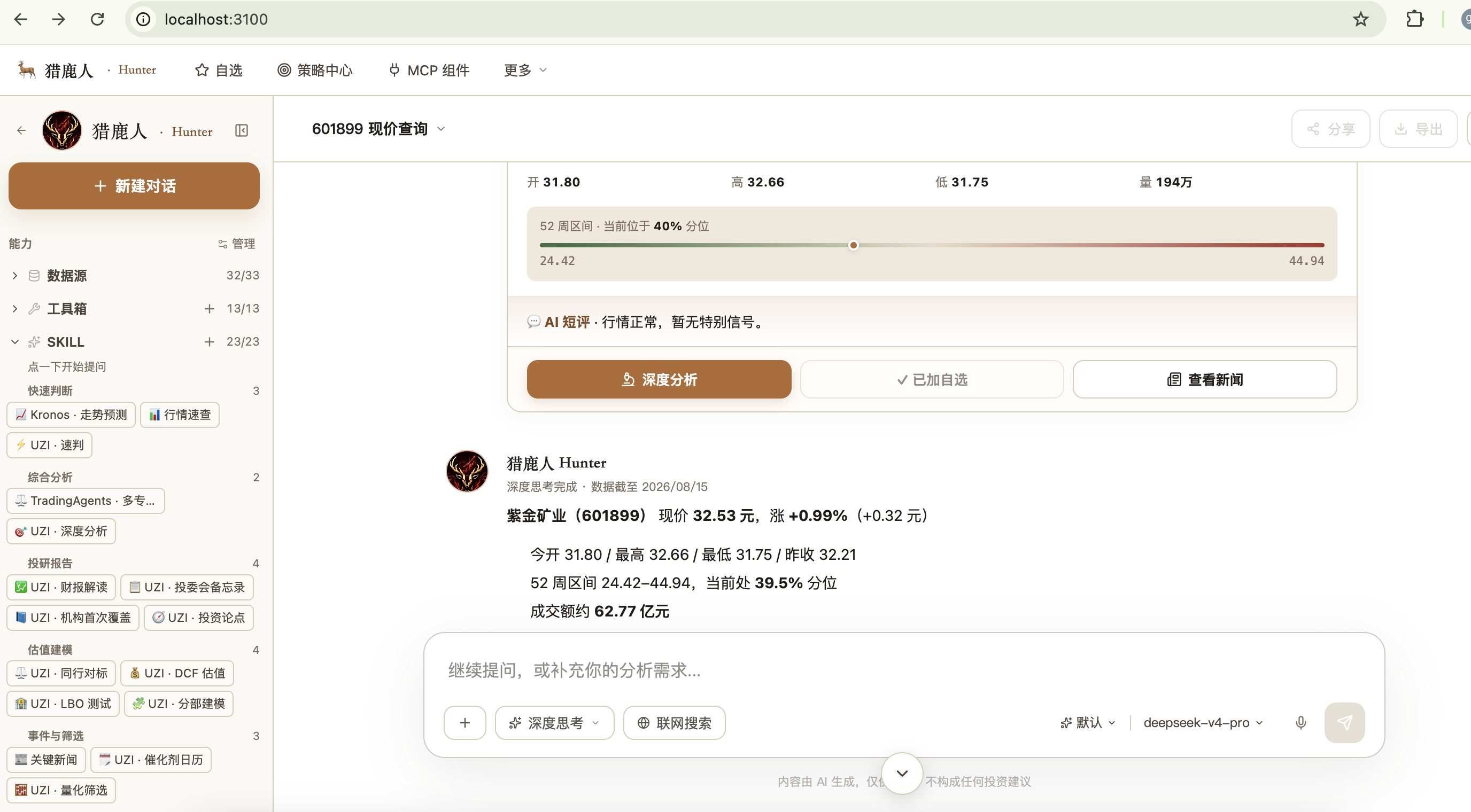
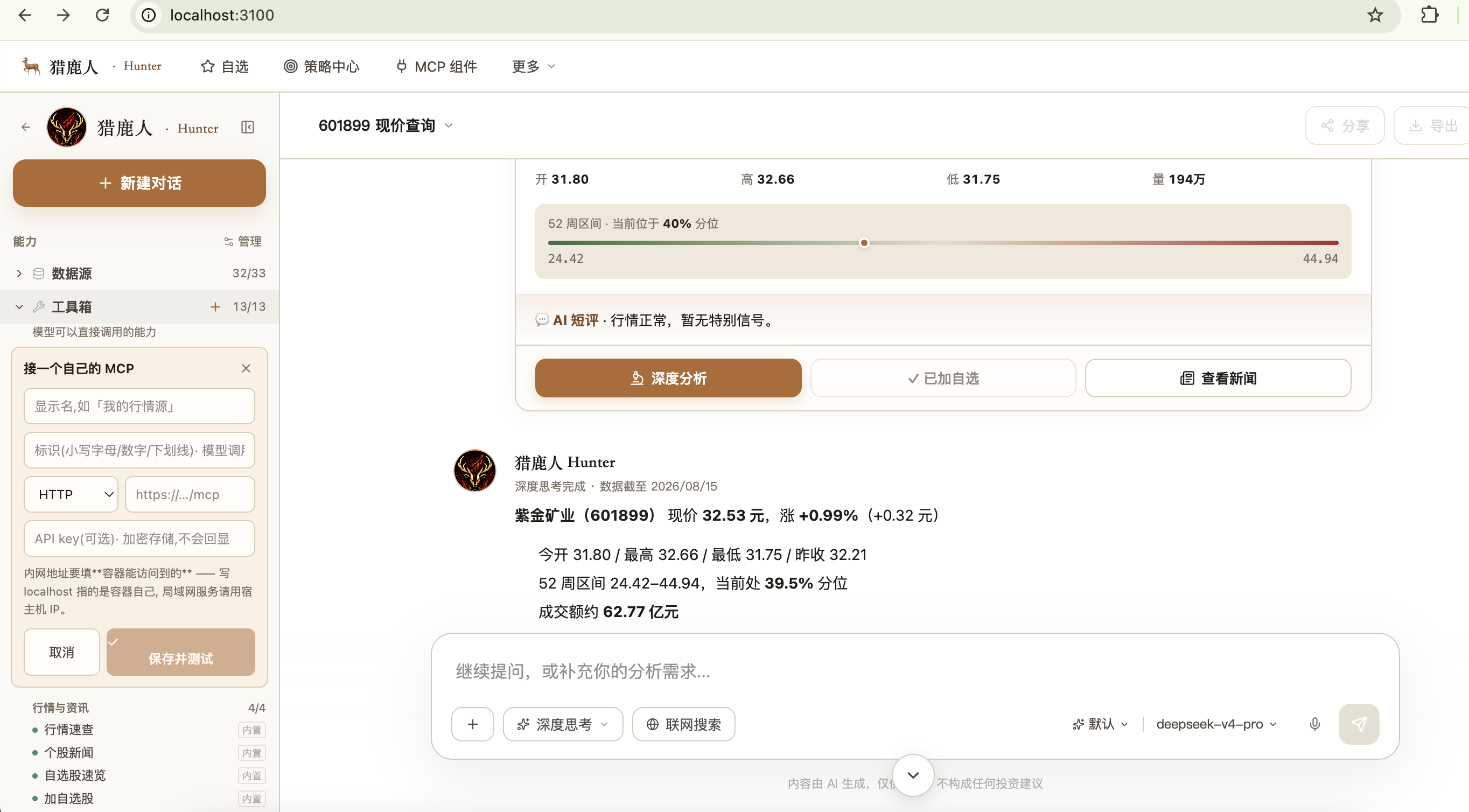
- 问「601899 现在多少钱」—— 返回富卡片(实时价 · 52 周分位 · AI 短评)
- 打开顶部「策略中心」—— 全市场扫描筛选器与小鹿研究台
- 点侧栏「UZI 深度分析」输入代码 —— 60–300 秒出多维度深度报告
起不来?先看 [常见问题](#-常见问题) 和 [`docs/01-getting-started.md`](https://github.com/agentpit-io/hunter-community/blob/HEAD/docs/01-getting-started.md),或到 [讨论区问答](https://github.com/agentpit-io/hunter-community/discussions/categories/q-a) 提问。
---
## 🔑 数据供给三选一
大模型 key 之外,数据怎么来由你决定,**不强制使用我们的平台 key**:
| 方式 | 需要谁的 key | 数据来源 | 适合谁 |
|---|---|---|---|
| **① 免费开源源** | 不需要 | AKShare(A 股)· 腾讯 / 新浪免费通道(港股 / 美股) | 先跑通看效果;A 股行情要在 `.env` 设 `DATA_SOURCE_PROVIDER=akshare`,见表下说明 |
| **② 自接工具 / MCP** | 你自己的 | 你的券商、数据商、自建 MCP,或 Cline / Cursor 生态里任意 MCP | 已有数据订阅,想接进来用;侧栏「工具箱 +」添加 |
| **③ 平台数据管道** | `hunt_tools_` 开头的 key,[免费申请](https://hunter.agentpit.io/dev/api-keys) | 平台汇总的行情、财报、新闻数据,UZI 深度分析所需数据,Kronos 走势预测 | 免费源不够用,想要更全的数据 |
**免费源怎么开**:`DATA_SOURCE_PROVIDER` 留空时默认是 `hunter`(平台数据管道),没 key 时 A 股行情会提示去申请 key,不会自动换成免费源;想免 key 看 A 股行情,在 `.env` 设 `DATA_SOURCE_PROVIDER=akshare`,再 `docker compose up -d`。港股 / 美股的行情和日线默认就走内置免费通道(腾讯 / 新浪),不用设。
平台 key 可以写进 `.env`,也可以在界面左下角「解锁全部工具」里粘贴,立即生效。平台只按 key 记录请求次数,看不到你的对话和持仓。
官方数据厂商 MCP 支持进展(2026-09-13 更新)
**当前立场:本项目不预置任何具体金融数据厂商的 MCP 集成,等与官方逐一沟通并拿到正式授权后再开放。**
- **同花顺(HiThink)· 待官方合作确认**:同花顺已在官方文档站列出 `fuyao.aicubes.cn/mcp/*` 系列 MCP 端点,允许开发者自助申请 key;但目前尚未获得同花顺对本项目作为集成方的书面授权,出于合规考虑不预置该数据源。我们正在联系官方,期待建立正式合作。
- **通达信(Tongdaxin)· 待官方开放 MCP 接入文档**:通达信官方目前没有对外公开授权的 API 地址与开发者文档,本项目不集成任何未公开授权的接口。我们正在沟通,期待让已购买付费 key 的用户能正常接入。
**目前可用**:免费开源源(AKShare / yfinance)+ 用户自持的第三方 MCP(通用接入,不预置具体厂商)。
**如果你来自数据厂商**:欢迎通过 GitHub Issues 或邮件联系我们探讨合作。
---
## ✨ 能做什么
|
**💹 数据**
- 实时行情 · A / 港 / 美股
- K 线 · 财报 · 新闻
- 龙虎榜 · 十大股东
- 北向 / 南向资金 · AH 溢价
- 巨潮公告 · 行业分类
|
**🧠 分析**
- UZI 深度分析 · 大佬评审团
- Kronos 走势预测(清华时序模型)
- 全市场扫描筛选器
- 小鹿研究台 · 量化因子与回测
|
**💬 交互**
- 流式对话 · 富卡片(报价 / 新闻 / 预测)
- 侧栏三层:数据源 / 工具箱 / SKILL
- 自选股卡片 · 持仓 · 投资论点
- 策略中心
|
**🔌 扩展**
- Markdown 写 SKILL
- 从 GitHub 一键装 SKILL
- 接自己的 MCP
- 大模型任选
|
---
## 📚 SKILL:把分析方法论变成能力
SKILL 是一段讲清「这类问题该怎么分析」的 Markdown,采用 **Anthropic Agent Skills 标准格式**,网上下载的标准 SKILL 不用改就能用。
**随代码内置 6 个**(`skills/` 目录):
| SKILL | 分类 | 说明 |
|---|---|---|
| `uzi` | 综合分析 | 投研总调度:按问题分发到深度研究、评审团、龙虎榜、风险扫描 |
| `investor_panel` | 综合分析 | 大佬评审团:模拟价值、成长、游资、量化等 9 大流派投票打分 |
| `deep_analysis` | 投研报告 | 多维度个股深度分析:基本面、技术面、资金面与投委会结论 |
| `lhb_analyzer` | 事件与筛选 | 龙虎榜分析:识别游资席位,判断机构与游资博弈 |
| `trap_detector` | 尽调风控 | 杀猪盘检测:扫描推荐来源、内幕消息、基本面脱节等信号 |
| `risk_profile` | 组合级 | 读写风险偏好、现金与单票上限,供组合建议使用 |
**更多来自社区**:侧栏 SKILL 一栏点「+」粘贴 GitHub 地址即可安装,装前可预览内容。
在线演示站额外安装的 18 个社区 SKILL(及来源仓库)
| 来源仓库 | SKILL |
|---|---|
| [prof-little-bear/cc-equity-research](https://github.com/prof-little-bear/cc-equity-research) | `catalyst_calendar` · `earnings_analysis` · `earnings_preview` · `idea_generation` · `initiating_coverage` · `model_update` · `morning_note` · `sector_overview` · `thesis_tracker` |
| [bmtrnavsky/nanobot-stock-trader](https://github.com/bmtrnavsky/nanobot-stock-trader) | `catalyst_growth_investor` · `longterm_quality_investor` · `stock_data` · `swing_trade_scanner` |
| [algoderiv/agent-skills](https://github.com/algoderiv/agent-skills) | `rice_quant` · `tqsdk` |
| [yennanliu/InvestSkill](https://github.com/yennanliu/InvestSkill) | `invest_stock_eval` |
| [tigersking520/stock-analysis-skill](https://github.com/tigersking520/stock-analysis-skill) | `stock_analysis` |
| 演示站界面内自建 | 1 个 |
以上为 2026-09-16 从演示站 `/api/catalog/skills` 读取的清单,各 SKILL 的许可证以来源仓库为准。
 想写自己的 SKILL?看 [扩展 HunterCode](#-扩展-huntercode)。
---
## ☁️ 选 Community 还是 Cloud
**会用 Docker、想掌控数据、想接自己的数据源或方法论 → Community(本仓库)。只想打开网页或手机就用、需要微信 / 飞书推送 → [Cloud](https://hunter.agentpit.io)。**
想写自己的 SKILL?看 [扩展 HunterCode](#-扩展-huntercode)。
---
## ☁️ 选 Community 还是 Cloud
**会用 Docker、想掌控数据、想接自己的数据源或方法论 → Community(本仓库)。只想打开网页或手机就用、需要微信 / 飞书推送 → [Cloud](https://hunter.agentpit.io)。**
逐项对比
| 能力 | Community(自部署) | Cloud([hunter.agentpit.io](https://hunter.agentpit.io)) |
|---|---|---|
| 对话(自带大模型 key) | ✅ | ✅ |
| 免费数据源(AKShare / yfinance) | ✅ 无需我方 key | ✅ |
| 接入自己的 MCP / 数据源 | ✅ 无需我方 key | ✅ |
| 内置 SKILL 与 GitHub 一键装 SKILL | ✅ | ✅ |
| UZI 深度分析 | ✅ 数据三选一 | ✅ |
| Kronos 走势预测 | ✅ 平台管道(免费)· 或自建 GPU · [直连说明](https://github.com/agentpit-io/hunter-community/blob/HEAD/docs/kronos-direct-access.md) | ✅ |
| 投资论点(本地存储) | ✅ 本地 Postgres | ✅ |
| 微信推送 / 飞书通知 | ❌ | ✅ |
| 多租户计费 | ❌ | ✅ |
---
## 📖 深入了解
🤖 大模型兼容性(7 个标准用例实测工具调用)
我们用 7 个标准用例实测每家模型能否正确调用工具 —— 对 HunterCode 来说,「能聊」不够,「会调工具」才算可用。
| 模型 | 接入 | 工具调用命中 | 平均耗时 | 推荐 | 注意 |
|---|---|---|---|---|---|
| **DeepSeek v4 pro** | 直连 `api.deepseek.com` | 6/7 | 30 秒 | ⭐⭐⭐⭐⭐ 直连默认 | 必开 `LLM_SCHEMA_SANITIZE=1` |
| **Claude Sonnet 5** | AIHubMix 网关 | 7/7 | 25.7 秒 | ⭐⭐⭐⭐⭐ 海外首推 | 容器直连可能被 TLS 指纹拦截,需宿主机代理 |
| **Qwen 3.8 Max** | AIHubMix 网关 | 7/7 | 48.1 秒 | ⭐⭐⭐⭐⭐ 国内首推 | 深度分析较慢 |
| **Gemini 3.5 Flash** | AIHubMix 网关 | 6/7 | 62.3 秒 | ⭐⭐⭐⭐ 便宜快 | 边界用例偶发过度调用 |
| **Doubao Seed 2.1 Pro** | AIHubMix 网关 | 6/7 | 103.9 秒 | ⭐⭐⭐ | 建议直连火山引擎 |
| **MiniMax M3** | AIHubMix 网关 | 6/7 | 77.3 秒 | ⭐⭐⭐⭐ | 思考过程泄漏已由 llm-shim 剥离 |
| **GPT-5.6 sol** | AIHubMix 网关 | 5/7 | 24.4 秒 | ⭐⭐⭐ | 部分用例选错工具 |
实测日期 2026-08-15 / 08-16。各家 `.env` 模板(含地址、模型名、清洗开关、已知坑):[`docs/env-samples/`](https://github.com/agentpit-io/hunter-community/blob/HEAD/docs/env-samples/)。评测方法与原始数据:[`docs/model-testing/`](https://github.com/agentpit-io/hunter-community/blob/HEAD/docs/model-testing/)([适配矩阵](https://github.com/agentpit-io/hunter-community/blob/HEAD/docs/model-testing/model-compat-matrix.md) · [评测脚本](https://github.com/agentpit-io/hunter-community/blob/HEAD/docs/model-testing/scripts/run-golden-cases.py))。
**思考类模型的 `` 泄漏**:MiniMax / Qwen thinking / Kimi thinking 会把推理过程夹在回复里,`scripts/llm-shim/shim.py` 在请求端关闭思考、响应端剥离标签,`LLM_STRIP_THINK=0` 可关闭。
🧠 投资论点:记住你当初为什么买
自选和持仓可以记录每只股票的投资论点(买入理由、关键假设、成本),数据存在本地 Postgres,不出你的机器。
想让 AI 持续跟踪论点是否还成立,可以安装社区 SKILL,例如 [prof-little-bear/cc-equity-research](https://github.com/prof-little-bear/cc-equity-research) 里的 `thesis_tracker`,在对话中结合最新数据复核。
> ⚠️ 论点复核结果是 AI 生成的研究参考,不构成投资建议。
🛠 技术栈
| 层 | 技术 |
|---|---|
| 前端 | Next.js 15(App Router)· React 19 · TypeScript 5 · Tailwind CSS · shadcn/ui |
| 后端 | FastAPI · Python 3.12 · httpx · loguru |
| 对话引擎 | [OpenCode](https://opencode.ai) 定制版 · MCP · Bun |
| 数据库 | Postgres 16 · Redis 7 |
| 大模型 | 任意 OpenAI 兼容网关 · Anthropic · Kronos |
| 认证 | JWT(HS256)· argon2id · 单用户 / 多用户可切换 |
| 部署 | Docker Compose · GHCR 镜像 |
🏗 架构
```
┌─────────────────────┐
浏览器 → │ web (Next.js 15) │ :3100
└────────┬────────────┘
│ /api/*(web 自带转发 · 无需反向代理)
┌────────▼────────────┐ ┌──────────────────┐
│ api (FastAPI) │ │ opencode 对话引擎 │
│ · 认证 (JWT) │◄───────┤ MCP 工具回调 │
│ · 数据 / 模型 / 预测 │ │ 插件:认证 / 守卫 / │
│ · SKILL 加载 │ │ 用量 / 审计 / 上下文│
│ · 分析智能体 │───► 平台数据管道(可选 · 一把 key)
└─┬─────────────┬─────┘ └────────┬─────────┘
│ 工具 schema 清洗
┌──────────▼─────────┐
│ llm-shim :3999 │──► 你的大模型网关
└────────────────────┘
Postgres Redis
:5442 :6479
```
- **web 转发层**:Next.js 转发 `/api/*` 与对话流,携带 JWT
- **hunter-mcp-context**:给工具调用注入当前用户身份
- **hunter-guard**:清洗 MCP schema(兜底 DeepSeek 拒绝 `parameters: null`)
- **hunter-auth**:JWT 门禁,关联会话与用户
- **hunter-budget**:用量记账,支持限额(自部署默认关闭)
- **hunter-audit**:完整审计日志 AUDIT.jsonl
📊 数据源 / 大模型 / 预测的切换(Provider 矩阵)
| 层 | 环境变量 | 可选值 | 留空时 |
|---|---|---|---|
| 数据源 | `DATA_SOURCE_PROVIDER` | `hunter` · `akshare` · `yfinance` · `saas` | `hunter`(没配平台 key 也是它) |
| 大模型 | `LLM_PROVIDER` | `openai_compat` · `anthropic` · `saas_gemini` | `openai_compat` |
| 预测 | `FORECAST_PROVIDER` | `kronos_saas` · `kronos_local` · `noop` | `kronos_saas` |
`DATA_SOURCE_PROVIDER` 只在没配平台 key 时决定实时行情从哪取:A 股直接用它,港股 / 美股先走内置免费通道、取不到才用它;配了 key 就不看它。AKShare 在容器里访问境内数据源时可能不稳定。返回结构与细节见 [`docs/02-providers.md`](https://github.com/agentpit-io/hunter-community/blob/HEAD/docs/02-providers.md)。
🔌 扩展 HunterCode
**1. 写自己的 SKILL(最简单)**
```
user-skills/
你的skill名/
SKILL.md
```
```markdown
---
name: 你的skill名
description: 一句话说明什么时候该用它 —— 模型据此判断要不要调用
---
# 正文写方法论
分几步、先看什么后看什么、注意什么。
```
放好后 `docker compose restart opencode api`,同名时你的覆盖内置的。想调用我们的数据和工具,在 frontmatter 里加 `hunter.needs_tools`,见 [`user-skills/README.md`](https://github.com/agentpit-io/hunter-community/blob/HEAD/user-skills/README.md)。
**2. 从 GitHub 一键装 SKILL**:侧栏 SKILL 一栏点「+」→ 粘贴 GitHub 地址 → 预览内容 → 安装。
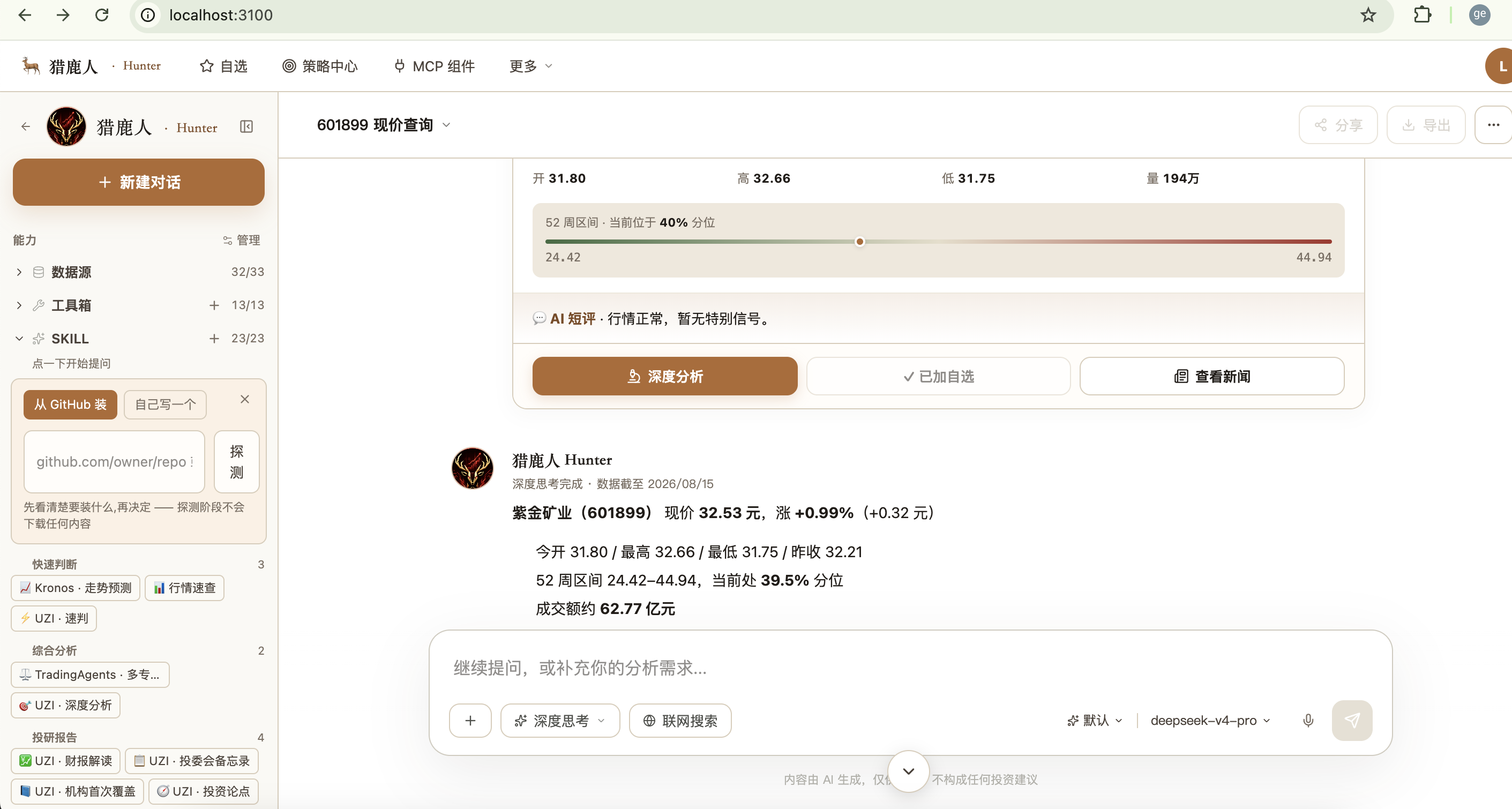 **3. 接自己的 MCP**:工具箱一栏点「+」,填名称、类型(HTTP / SSE / stdio)、地址和 key,工具描述直接提供给模型。
---
## ❓ 常见问题
opencode 一直 Restarting?
大概率是大模型三项没填全。`docker compose logs opencode --tail 20` 会明确说缺哪个:`LLM_BASE_URL`、`LLM_DEFAULT_MODEL`、`LLM_API_KEY`。DeepSeek 还需 `LLM_SCHEMA_SANITIZE=1`。
DeepSeek 发消息后只显示「深度思考完成」,或报 400 "Invalid schema type: null"?
在 `.env` 加 `LLM_SCHEMA_SANITIZE=1`,然后 `docker compose up -d`(必须 up,restart 不会重读 `.env`)。
深度分析报告是空的?
平台 key(`HUNTER_API_KEY`)没填或无效时拿不到完整数据。去 [hunter.agentpit.io/dev/api-keys](https://hunter.agentpit.io/dev/api-keys) 免费申请,或在界面左下角「解锁全部工具」粘贴。
改了 skills/ 后不生效?
opencode 只在启动时扫描一次 SKILL 目录:
```bash
docker compose restart opencode # 约 50 秒
python scripts/check_skill_sync.py # 比对磁盘与 opencode 实际加载的 SKILL
```
端口被占用?
改 `.env` 里的 `WEB_HOST_PORT` / `API_HOST_PORT` / `POSTGRES_HOST_PORT`,同时把 `NEXT_PUBLIC_API_URL` 改成新的 API 端口。
更多问题
见 [`docs/01-getting-started.md`](https://github.com/agentpit-io/hunter-community/blob/HEAD/docs/01-getting-started.md) 的常见报错,或到 [讨论区问答](https://github.com/agentpit-io/hunter-community/discussions/categories/q-a) 提问。
---
## 🤝 参与贡献
**最简单的贡献是写一个 SKILL** —— 懂一种分析方法、会写 Markdown 就够了。其次是文档和翻译,再次是代码。
- 新手任务:[`good first issue`](https://github.com/agentpit-io/hunter-community/issues?q=is%3Aissue+is%3Aopen+label%3A%22good+first+issue%22) · 征集中的 SKILL:[`skill-wanted`](https://github.com/agentpit-io/hunter-community/issues?q=is%3Aissue+is%3Aopen+label%3Askill-wanted)
- 完整流程:[CONTRIBUTING.md](https://github.com/agentpit-io/hunter-community/blob/HEAD/CONTRIBUTING.md)
- 用 HunterCode 做出了好的分析?欢迎到 [成果展示](https://github.com/agentpit-io/hunter-community/discussions/categories/show-and-tell) 分享
### 🙏 贡献者
贡献者名单由 [All Contributors](https://allcontributors.org) 机器人维护。维护者在 issue 或 PR 下评论 `@all-contributors please add @用户名 for code` 即可添加,贡献类型见 [类型说明](https://allcontributors.org/docs/en/emoji-key)(代码、文档、SKILL 内容、翻译、报 bug、出点子等都算)。
### 🧩 基于 HunterCode 的项目
| 项目 | 说明 |
|---|---|
| [HunterCode Cloud](https://hunter.agentpit.io) | 官方托管版,含微信 / 飞书推送 |
你基于 HunterCode 做了二次开发或 fork?欢迎在 [讨论区](https://github.com/agentpit-io/hunter-community/discussions) 告诉我们,我们会加到这里。
### 💝 感谢推荐分享
- 社区:[LINUX DO](https://linux.do/) —— 中文开发者社区
---
## 💬 社区与支持
| 渠道 | 入口 |
|---|---|
| 💡 GitHub 讨论区 | [提问 · 分享 · 建议](https://github.com/agentpit-io/hunter-community/discussions) |
| 💬 微信(拉群交流) | `agentpit` |
| 📱 微信公众号 | `agentpit.io` |
| 🐦 X | [@agentpit_io](https://x.com/agentpit_io) |
**遇到 bug**:[提交 issue](https://github.com/agentpit-io/hunter-community/issues/new/choose) · **安全漏洞**:请勿公开,见 [SECURITY.md](https://github.com/agentpit-io/hunter-community/blob/HEAD/SECURITY.md)
---
## 🗺 路线图
- [x] **v0.1** · 自部署骨架、本地账号认证、可插拔数据 / 大模型 / 预测层
- [x] **v0.2** · opencode 对话引擎、插件与 MCP、一把 key 通用、GitHub 一键装 SKILL
- [x] **v1.0.0**(2026-09-13)· 全市场扫描筛选器、小鹿智能体研究台、量化因子与回测按市场隔离、SKILL 导入附属文档与中文说明、kronos / truesource MCP 发布、会话数据落具名卷 —— [完整更新日志](https://github.com/agentpit-io/hunter-community/blob/HEAD/CHANGELOG.md)
- [x] **v1.0.1**(2026-09-17)· 对话引擎镜像 **7.56 GB → 618 MB**(下载量 1.70 GB → 153 MB)、api 镜像 1.32 GB → 909 MB、入口脚本固化、每日部署冒烟 CI、文档与社区基建 —— [瘦身过程与实测](https://github.com/agentpit-io/hunter-community/blob/HEAD/docs/image-slim/)
- [x] **v1.1.0**(2026-09-18)· 免改配置文件开箱即用 —— [里程碑](https://github.com/agentpit-io/hunter-community/milestone/2)
- [x] 六个服务全部预构建镜像 + amd64/arm64 双架构(`v1.1.0-rc1`)
- [x] 数据库迁移改为 api 启动时自动执行;`JWT_SECRET` 等密钥首次启动自动生成
- [x] 大模型配置可存库(不再只能写 `.env`),改配置热生效、无需重启容器
- [x] 图形化首启向导(选模型 → 填 key 当场测试 → 直接对话)
- [x] 五个平台的部署方案(Zeabur / Sealos / Railway / 1Panel / Coolify·Dokploy)
—— 模板与文档就绪并做过等价验证,但**都还没在真实平台上跑过、也都没上架**,
所以本版不放部署按钮,见 [一键部署到云平台](#-一键部署到云平台)
- 进度与实测数据:[`docs/setup-wizard/`](https://github.com/agentpit-io/hunter-community/blob/HEAD/docs/setup-wizard/)
- [ ] **下一步** · 拿到平台账号后逐个实测并上架(那时才加按钮)、国内镜像源、arm64 真机验证
想要什么功能?到 [讨论区想法分区](https://github.com/agentpit-io/hunter-community/discussions/categories/ideas) 投票。
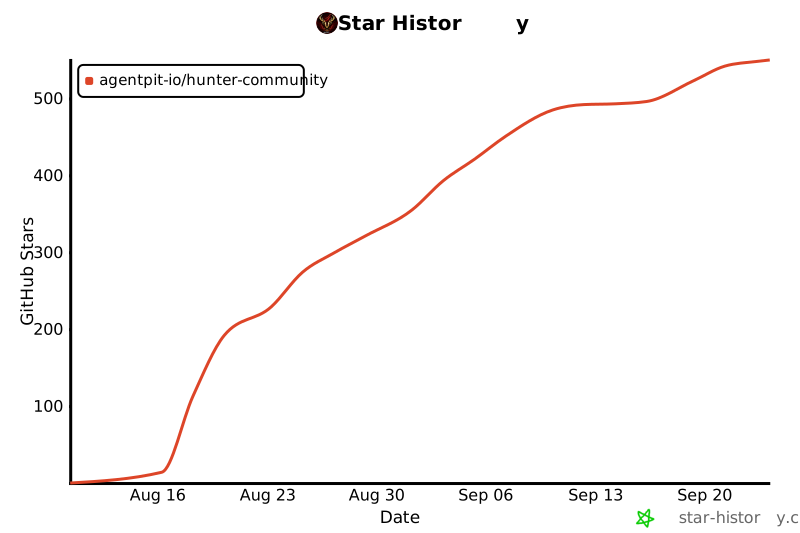
## ⭐ Star 趋势
[](https://star-history.com/#agentpit-io/hunter-community&Date)
---
## ™️ 商标与 Fork
HunterCode · Hunter · AgentPit · 猎鹿人 是 AgentPit 团队的商标。
- **自用 fork、内部部署、学习修改**:不需要改名,随便用。
- **对外分发、提供托管服务、商业发布**:请去掉上述名称与 Logo,可注明「based on HunterCode Community Edition」。
代码遵循 [Apache 2.0](https://github.com/agentpit-io/hunter-community/blob/HEAD/LICENSE),商标条款不影响你对代码的任何权利。另见 [NOTICE](https://github.com/agentpit-io/hunter-community/blob/HEAD/NOTICE)。
**⭐ 觉得有用请点 Star,这是我们继续维护的动力**
Made with ❤️ by [AgentPit](https://agentpit.io) team


