# aegis-mcp [Health: Active]
**Category:** 💰 Finance & Fintech
**Repository:** https://github.com/cleburn/aegis-mcp
**GitHub Stars:** 3
**Views:** 0
**Installs:** 0
**Upvotes:** 0
**Directory Page:** https://allmcps.com/mcp/aegis-mcp
## Description
Runtime governance enforcement for AI agents. Zero token overhead.
## Claude Desktop Quick Installation
Remote MCP endpoint (confidence: high). Install path detected from listing signals. Add as a URL/SSE server in your client:
```json
"mcpServers": {
"aegis-mcp": {
"url": "https://img.shields.io/npm/v/aegis-mcp-server?style=flat&label=npm"
}
}
```
## Documentation & README
# aegis-mcp-server


**MCP enforcement layer for the [Aegis](https://github.com/cleburn/aegis-spec) agent governance specification.**
Policy at the root. Enforcement at runtime. Accountability on every action.
## What It Does
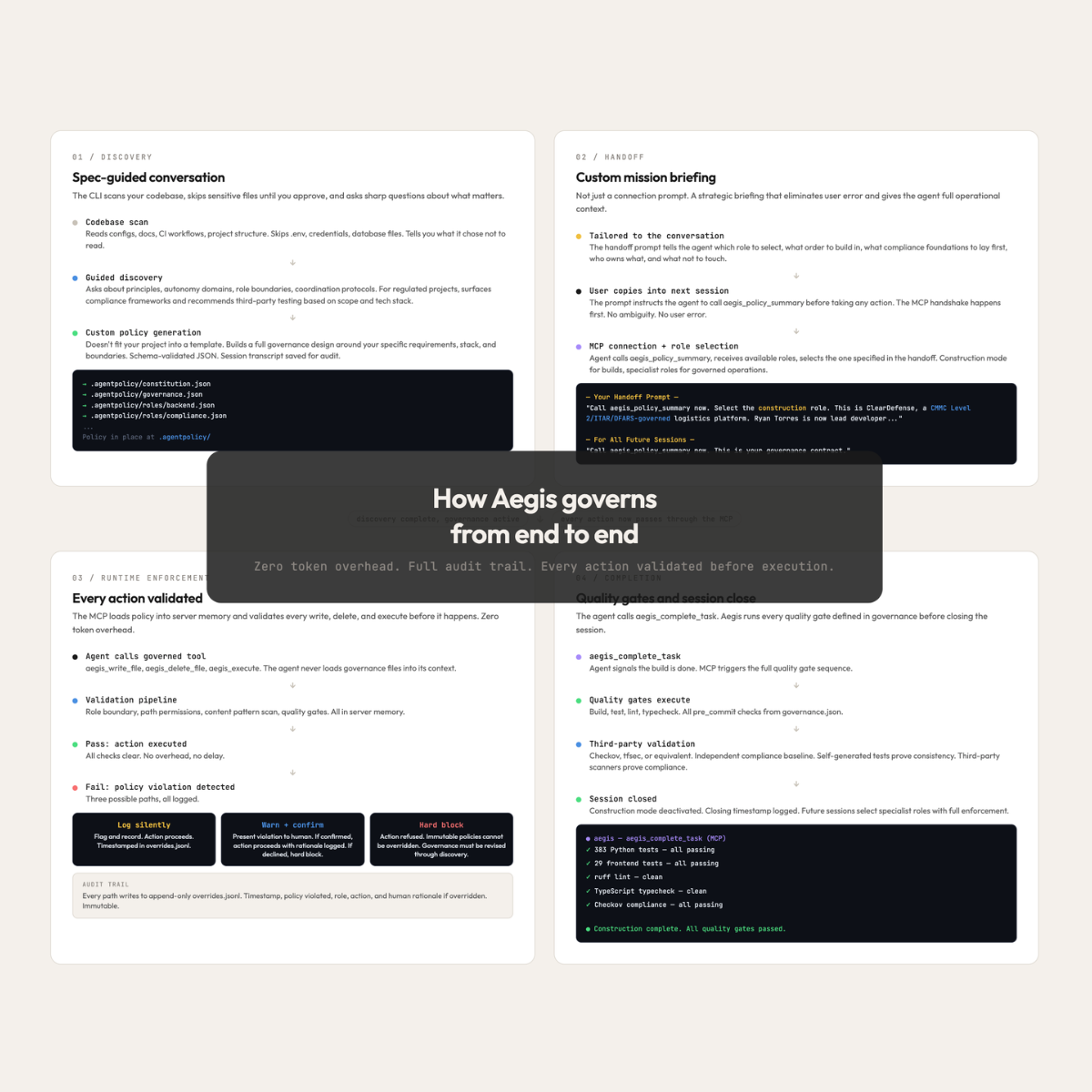
`aegis-mcp-server` is an MCP server that validates every agent action against your `.agentpolicy/` files **before** it happens. Path permissions, content scanning, role boundaries, quality gates — all enforced at runtime with zero token overhead to the agent.
The agent never loads your governance files. The MCP server reads them into its own process memory and validates silently. The agent calls governed tools and gets back either a success or a blocked response with the specific reason.
## Quick Start
```bash
# Install globally
npm install -g aegis-mcp-server
```
If you generated your policy with [aegis-cli](https://github.com/cleburn/aegis-cli), the `.mcp.json` connection config is already in your project root. Just install the MCP and open your agent — it connects automatically.
### First Prompt
When starting a new agent session in a governed project, use this as your first prompt:
```
Call aegis_policy_summary now. This is your governance contract — it defines your
role, your boundaries, and which tools to use. Do not take any action until you have
called this tool and received confirmation from the user to proceed.
```
For initial builds, the [Aegis CLI](https://github.com/cleburn/aegis-cli) generates a custom handoff prompt tailored to your project — use that instead.
## How It Works
### Universal Mode (Default)
The MCP starts without a pre-assigned role. When the agent calls `aegis_policy_summary`, it receives the list of available roles — including the built-in **construction** role and all specialist roles from `.agentpolicy/roles/`. The agent presents them to the user, the user picks, and the agent calls `aegis_select_role` to lock in. All enforcement uses the selected role for the rest of the session.
This is the default behavior — no configuration needed beyond the `.mcp.json` that `aegis init` creates automatically.
### Construction Mode
The **construction** role is always available for initial builds and major restructuring. When selected:
- The agent has full repository access (all paths writable and readable)
- The `.agentpolicy/` files serve as the blueprint — the agent reads constitution, governance, and role files to understand the project's architecture, conventions, and quality standards
- File operations run through native tools rather than governed tools, for speed
- The MCP logs the construction session start to `state/overrides.jsonl` with a timestamp and `human_confirmed: true`
- When the build is complete, the agent calls `aegis_complete_task` to run quality gates and close construction mode — the closing timestamp is logged alongside the opening entry
- All future sessions after construction should select a specialist role for governed operations
Construction mode is not a bypass — the agent still follows the governance files as its blueprint. It's a speed optimization for greenfield builds where enforcing write restrictions on every file would be counterproductive.
### Fixed Mode
If you know which role to assign at startup:
```json
{
"mcpServers": {
"aegis": {
"command": "aegis-mcp",
"args": ["--project", ".", "--role", "backend"]
}
}
}
```
The MCP locks to that role immediately. `aegis_policy_summary` returns the role's boundaries directly, skipping role selection.
## Tools
| Tool | What it does | Token cost |
|------|-------------|------------|
| `aegis_policy_summary` | Role boundaries and governance summary (or available roles in universal mode) | ~200 tokens |
| `aegis_select_role` | Select a role (including construction) in universal mode | Tiny |
| `aegis_check_permissions` | Pre-check if an operation is allowed | Tiny |
| `aegis_write_file` | Governed write with path + content validation | Same as a normal write |
| `aegis_read_file` | Governed read with path validation | Same as a normal read |
| `aegis_delete_file` | Governed delete with path validation | Tiny |
| `aegis_execute` | Governed command execution | Command output only |
| `aegis_complete_task` | Run quality gates and close construction mode if active | Gate results only |
| `aegis_request_override` | Execute a blocked action after human confirmation | Tiny |
## Zero Token Overhead
Traditional approach: load governance files into the agent's context window. Token cost scales with policy complexity.
Aegis MCP approach: the server loads policy into its own process memory. The agent calls tools and gets structured results. A project with 200 lines of governance has the same token cost as one with 20 lines. The complexity is absorbed by the server, not the agent.
## Enforcement
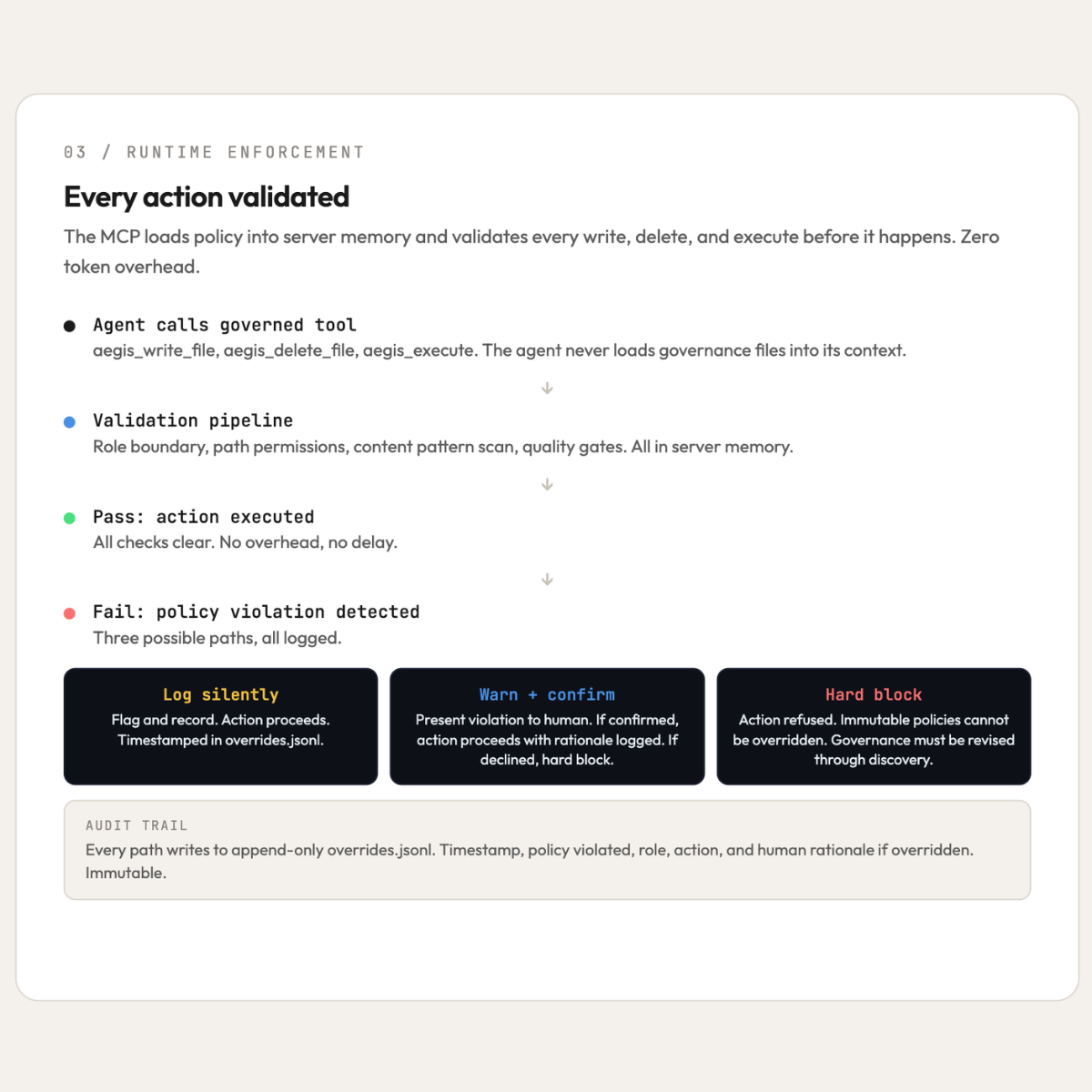
- **Governance boundaries** — `writable`, `read_only`, `forbidden` path lists
- **Role scoping** — agents confined to their role's writable and readable paths
- **Sensitive pattern detection** — content scanned against governance-defined regex patterns (content only, not path-based)
- **Cross-domain boundaries** — imports validated against shared interface rules
- **Quality gate validation** — `pre_commit` flags mapped to `build_commands` and executed
- **Override logging** — every blocked action logged to append-only `overrides.jsonl`
- **Immutable policies** — designated rules that cannot be overridden, ever
- **Construction session logging** — start and end timestamps for initial builds
## Override Protocol
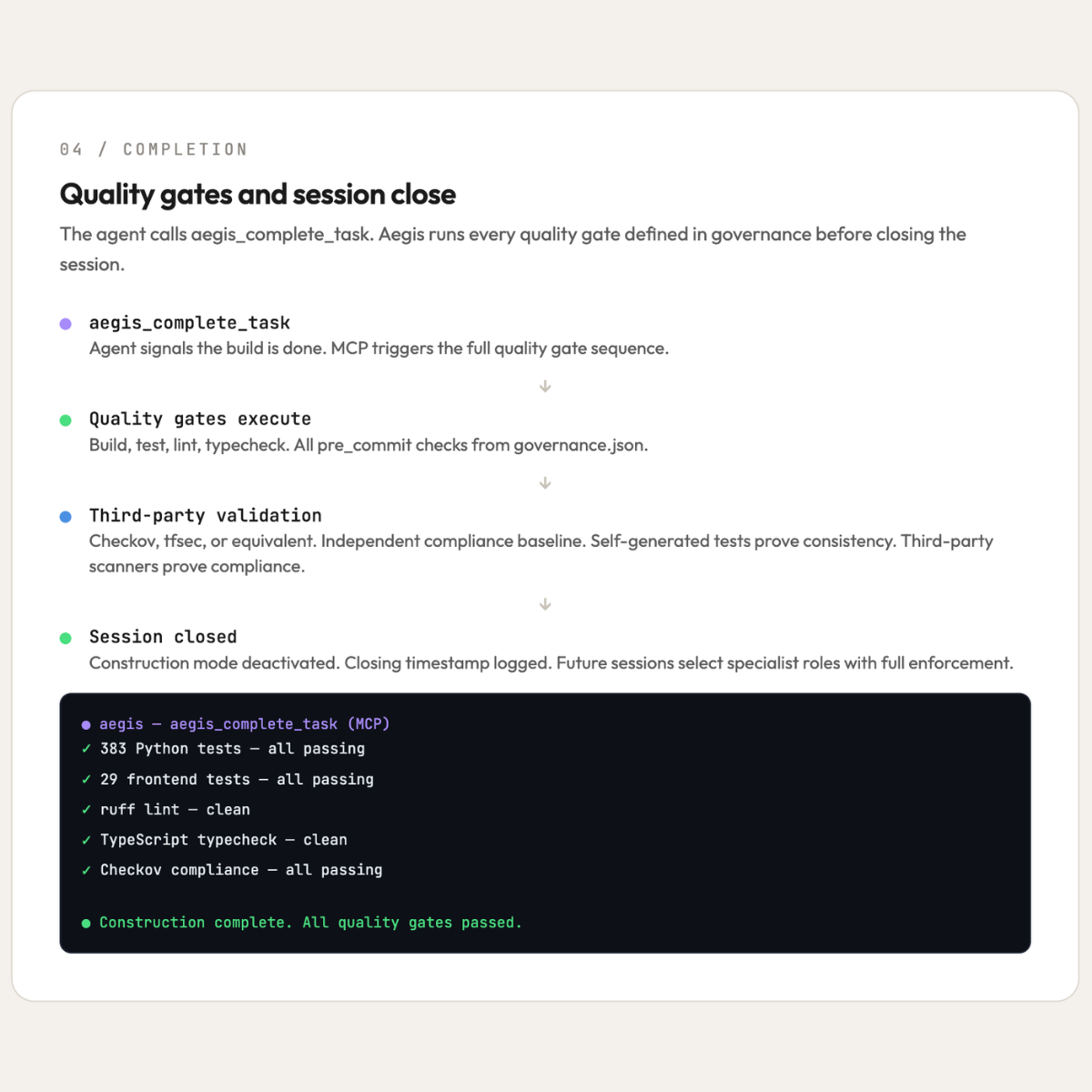
When an action is blocked and the governance override behavior is `warn_confirm_and_log`:
1. The blocked response includes an `override_token` and the specific policy violated
2. The agent presents the violation to the user
3. If the user confirms, the agent calls `aegis_request_override` with the token and the user's rationale
4. The action proceeds — the override is logged with `human_confirmed: true`
5. Normal governance resumes immediately — the override is a one-time exception
Immutable policies (e.g., HIPAA compliance, ITAR data sovereignty, audit completeness) return `override_available: false` and cannot be overridden. The user must modify the governance through `aegis init`.
## Consent-Based Governance
The Aegis MCP does not override the agent's native directives. It introduces itself through tool descriptions, explains why governance is active, and asks the agent to seek user permission to route write operations through Aegis tools. The user's authority is the enforcement mechanism.
Native tools for reading, searching, and exploring the codebase work fine without governance gating. Only write, delete, and execute operations benefit from routing through Aegis.
## Architecture
```
Agent ──→ aegis-mcp-server ──→ File System
│
├── Loads .agentpolicy/ into process memory (once)
├── Watches for policy changes (auto-reload)
├── Validates every tool call against policy
├── Returns success or blocked with override option
└── Logs all enforcement decisions to overrides.jsonl
```
Three artifacts, one governance framework:
- [**aegis-spec**](https://github.com/cleburn/aegis-spec) — The governance standard
- [**aegis-cli**](https://github.com/cleburn/aegis-cli) — Generates the governance
- **aegis-mcp-server** — Enforces the governance
## License
MIT